How to Fill Out Form 1095-A (2026): Line by Line
Form 1095-A Instructions, Line by Line
Reviewed by Zendocs Team. Updated 26 November 2026. 18 min read. Based on Form 1095-A (2026) and its IRS instructions.
Form 1095-A
How to Fill It Out
Line-by-line guide with a completed example
Quick answer
- Form 1095-A is completed by the Marketplace, not by you. You use the copy it sends to complete Form 8962.
- Part I identifies you and the policy, Part II lists who was covered, and Part III shows the premiums and advance payments month by month.
- Check the names and months in Part II and look for a zero or blank in Part III, column B.
- Do not attach Form 1095-A to your return. Keep it with your tax records.
- If anything is wrong, ask the Marketplace for a corrected form. A form marked VOID is not used to claim the credit.
What you need before you start
Form 1095-A is filled in by the Health Insurance Marketplace, not by the person who receives it. The form itself tells you not to attach it to your tax return and to keep it for your records. This guide explains every line so you can read your own copy, spot errors and carry the right numbers to Form 8962. You will need:
- Your Form 1095-A from the Marketplace where you enrolled, one for each policy. HealthCare.gov explains where to find it in How to use Form 1095-A.
- Form 8962, Premium Tax Credit, and its instructions, because the numbers on Form 1095-A go onto that form. See About Form 8962.
- Your records of who is in your tax family and any changes you told the Marketplace about during the year, such as a move, a new job, a birth or a change in income.
- The edition that matches your coverage year. The screenshots below use the 2026 edition, which is the current one. The 2025 edition has the same parts and lines, so check the instructions for your coverage year for dates and wording.
Form 1095-A fields at a glance
| Line | What to enter | Required |
|---|---|---|
| Lines 1 to 3 | Marketplace state, policy number and policy issuer's name | Entered by the Marketplace |
| Line 4 | Recipient's name (the tax filer identified at enrollment) | Entered by the Marketplace |
| Line 5 | Recipient's Social Security number | Entered by the Marketplace, may show only the last four digits on your copy |
| Line 6 | Recipient's date of birth | Only if line 5 is blank |
| Lines 7 to 9 | Spouse's name, Social Security number and date of birth | If there is a spouse and advance payments were made, date of birth only if line 8 is blank |
| Lines 10 and 11 | Policy start date and termination date | Entered by the Marketplace |
| Lines 12 to 15 | Recipient's address | Entered by the Marketplace |
| Lines 16 to 20, columns A to E | Each covered person's name, Social Security number, date of birth, coverage start and end dates | One line per covered person, date of birth only if the number is blank |
| Lines 21 to 32, column A | Monthly enrollment premiums | Each month of coverage |
| Lines 21 to 32, column B | Monthly second lowest cost Silver plan (SLCSP) premium | Each month of coverage, check for zero or blank |
| Lines 21 to 32, column C | Monthly advance payment of the premium tax credit | Each month of coverage |
| Line 33 | Annual totals of columns A, B and C | Sum of lines 21 to 32 |
Step by step: Form 1095-A line by line
Each step below says what the Marketplace enters on the line, what the entry means and what to check on your own copy. The screenshots show made-up sample data.
Know who completes the form
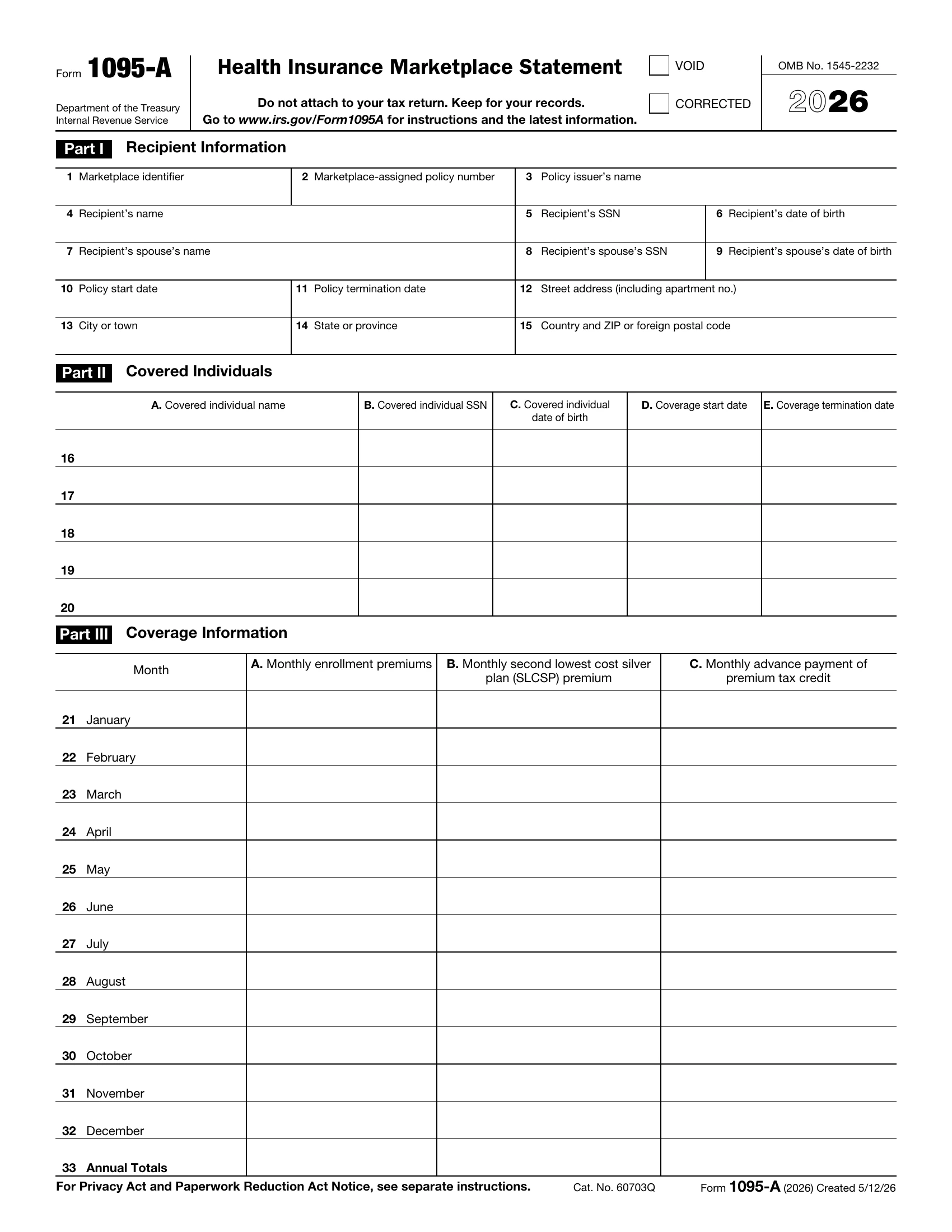
The Marketplace fills in a separate Form 1095-A for each policy and sends it to you and to the IRS, so on a real statement there is nothing for you to type. There is also no signature or date line to complete. The image below shows the 2026 form with its three parts, and the steps that follow show made-up data on each line so you can see where each entry sits.
Why this matters: the numbers on the form decide how much premium tax credit you can claim on Form 8962, so reading them correctly is your part. The IRS says that if you expect a Form 1095-A you should wait for it before you file; see its questions and answers on health care information forms.

Check the VOID and CORRECTED boxes
At the top of the form the Marketplace checks VOID if the statement was sent in error and CORRECTED if it replaces an earlier statement that contained errors. Look at these two boxes before anything else, because they tell you whether the form can be used at all.
A CORRECTED form replaces the one you had before, so use it on Form 8962. A VOID form, and the statement it cancels, is not used to claim the credit, though HealthCare.gov suggests keeping it in case you need to show the IRS that the coverage was canceled. If you already filed using a form that was later corrected or voided, see the correcting section below and the IRS page on corrected, incorrect or voided forms.

Part I, lines 1 to 3: the Marketplace and the policy
Line 1 is the state name or abbreviation of the Marketplace where you enrolled. Line 2 is the policy number the Marketplace assigned, and if the number is longer than 15 characters only the last 15 are shown. Line 3 is the name of the company that issued the policy.
Why this matters: you get one statement per policy, so these lines tell you which policy a form describes. HealthCare.gov lists the usual reasons for more than one form: you changed plans, you updated your application and a new enrollment resulted, household members were on different plans, or more than five people were on one plan. Make sure you have every form and use all of them on Form 8962.

Part I, lines 4 to 6: the recipient
Line 4 is the recipient: the person the Marketplace identified at enrollment as the tax filer, meaning the person expected to file a return, claim other family members as dependents and, if qualified, take the premium tax credit. If no tax filer can be identified, for example because no financial assistance was requested, the Marketplace enters the primary applicant. Line 5 is the recipient's Social Security number, and the copy sent to you may show only the last four digits. Line 6, the date of birth, is filled in only when line 5 is blank.
What to check: the name and number. HealthCare.gov says that if personal details such as your name, address, date of birth or Social Security number are wrong, you do not need a corrected form, because you can fix them on the forms you send to the IRS.

Part I, lines 7 to 9: the spouse
Lines 7 to 9 give the recipient's spouse's name, Social Security number and date of birth. The Marketplace fills them in when the recipient has a spouse and advance payments of the premium tax credit were made for the coverage, even if those payments were not made for the spouse's own coverage. The date of birth on line 9 appears only when line 8 is blank.
Why this matters: a spouse can be part of the tax family when you file a joint return, which is why the form asks for these details. If you have no spouse, or no advance payments were made, these lines are blank.

Part I, lines 10 to 15: policy dates and address
Line 10 is the date the policy started, which is January 1 of the coverage year if the policy was already in effect at the start of the year. Line 11 is the termination date if the policy ended during the year, or December 31 if it was still in effect at the end of the year. Lines 12 to 15 are the recipient's address: street address, city or town, state or province, and country and ZIP or foreign postal code.
What to check: compare the dates with your own records. They show how long the policy ran, while the months that count for the credit are shown one by one in Part III.

Part II, lines 16 to 20: the covered individuals
Part II lists each person covered under the policy, one person per line. Column A is the name, column B the Social Security number, column C the date of birth (filled in only when column B is blank), column D the date coverage started for that person, and column E the date it ended, or December 31 if it was still in effect at the end of the year. If more than five people are covered, the Marketplace completes additional Part II pages.
Who is listed: when advance payments were made, or when the tax family can be identified, the Marketplace lists only the people the tax filer said at enrollment would be in the tax family. Anyone else on the same policy, including children who are not in the tax family, is reported on a separate Form 1095-A. What to check: every person you expect is there and the coverage dates are right. HealthCare.gov says that a missing household member or a wrong coverage month is a reason to contact the Marketplace call center.

Part III, column A: monthly enrollment premiums
Part III covers each month of coverage, lines 21 (January) to 32 (December), with the totals on line 33. Column A is the monthly enrollment premium: the total monthly premium for the policy, counting only the part allocated to essential health benefits. If a covered person is in a stand-alone dental plan, the part of that premium for pediatric dental coverage is included.
This figure can differ from what you paid. HealthCare.gov gives the usual reasons: the plan includes benefits beyond the essential health benefits, such as adult dental or vision, coverage started or ended in the middle of a month, or a child under 18 is in a stand-alone dental plan. In a month when the premium was not fully paid, the form shows the full premium only in a few cases set out in the instructions, such as the first month of a grace period. Otherwise the entry for that month is zero.

Part III, column B: the second lowest cost Silver plan premium
Column B is the premium for the applicable second lowest cost Silver plan (SLCSP), the benchmark the Marketplace uses to work out the monthly advance payments. It is the entry most worth checking, because the IRS describes it as a factor that determines your monthly premium tax credit.
What it covers: the SLCSP that applies to the people in Part II who were identified at enrollment as members of the tax family, were enrolled on the first day of the month and were not eligible for other health coverage that month. If all covered people enrolled after the first of a month, and none of the birth, adoption, foster placement or court order exceptions applies, the entry for that month is zero.
What to check: HealthCare.gov says the SLCSP premium is incorrect if column B shows zero or is blank for a month when someone in your household had the plan, or if you had household changes you did not report, such as a baby, a move, a marriage, a divorce or a dependent you lost. In that case use the tax tool described in HealthCare.gov's guide to Form 1095-A, or see how the IRS describes the correct figure on its Health Insurance Marketplace statements page.

Part III, column C: advance payments of the premium tax credit
Column C is the monthly advance payment of the premium tax credit: the amount paid to your insurance company each month to lower your premium. If more than one Form 1095-A covers your family for the same months, each form shows only the amount allocated to its own policy, and any advance payments for a stand-alone dental plan are added to one of the policies.
Why this matters: Form 8962 compares these advance payments with the credit you are allowed for the year. If you used too much, you repay the excess through your taxes. If you used too little, you claim the difference as a credit, according to HealthCare.gov.

Line 33: annual totals
Line 33 adds up lines 21 to 32 for each of columns A, B and C. Form 8962 takes these annual totals from line 33, so check that each total matches the sum of the twelve monthly amounts above it. Months with no coverage are blank or zero and do not add anything.

Carry the numbers to Form 8962
Once the form is accurate, use it to complete Form 8962: the annual totals from line 33 go into the annual calculation, and the monthly figures from lines 21 to 32 are used when Form 8962 asks for monthly amounts. Follow the Instructions for Form 8962 for the calculation itself. Do not attach Form 1095-A to your return, and keep it with your tax records.
Form 1095-A examples by situation

Family of three covered all year
- Part II: Jane A., John B. and Alex C. Sample, each covered from 01/01/2026 to 12/31/2026, with the date of birth in column C because no Social Security number is shown.
- Part III: 1,150.00 in column A, 1,300.00 in column B and 890.00 in column C for every month from January to December.
- Line 33: 13,800.00, 15,600.00 and 10,680.00, each monthly amount times 12.
- Why: coverage was in effect on the first day of every month, so every month carries a full set of figures and the twelve rows are identical.

Coverage starts October 1
- Part I: policy start 10/01/2026 and termination 12/31/2026.
- Part III: lines 21 to 29 (January to September) stay empty. Lines 30 to 32 (October to December) show 1,150.00, 1,300.00 and 890.00.
- Line 33: 3,450.00, 3,900.00 and 2,670.00, each monthly amount times 3.
- Why: coverage began on the first day of October, so only three months carry figures and the totals add three months, not twelve.

Coverage starts November 15
- Part I: policy start 11/15/2026 and termination 12/31/2026.
- Part III: lines 21 to 30 stay empty. November shows 575.00 in column A, a zero in column B and 445.00 in column C. December shows 1,150.00, 1,300.00 and 890.00.
- Line 33: 1,725.00, 1,300.00 and 1,335.00, the November and December amounts added together.
- Why: coverage began after the first day of November, so column B is zero for that month under the instructions, while columns A and C show made-up part-month amounts.
Completed Form 1095-A example

Sample for illustration only. Not a real form. Do not submit.
If a field does not apply
Many lines on Form 1095-A are blank on purpose. These are the cases that most often raise questions on a real statement.
- Line 6 or line 9 (date of birth) is empty: that is normal when the Social Security number is shown on line 5 or line 8. The date of birth appears only when the number is blank.
- Lines 7 to 9 (spouse) are empty: there is no spouse, or no advance payments of the premium tax credit were made for the coverage.
- Column B is zero or blank for a month: zero can be correct when all covered people enrolled after the first day of the month and no birth, adoption, foster placement or court order exception applies. If someone was covered from the first day, or you reported a household change, ask the Marketplace whether the figure is right.
- More than five people are covered on the policy: the Marketplace adds Part II pages for the extra people.
- A household member is missing from Part II: that person may be reported on a separate Form 1095-A, for example because they are not in your tax family. Check every form you received before assuming something is wrong.
Common mistakes and how to avoid them
Most problems with Form 1095-A come from timing and from not checking the numbers before using them. These are the ones to watch for.
Filing before the form arrives
The IRS says that if you enrolled through the Marketplace you should wait to file until you receive Form 1095-A. Under the IRS instructions the Marketplace furnishes it by January 31. HealthCare.gov says to expect it by mail by mid-February, and that it may appear in your Marketplace account as early as mid-January. Filing with estimated figures can lead to a mismatch with the Marketplace data the IRS holds.
Ignoring a zero or blank in column B
A zero or blank benchmark premium for a month when someone was covered can lead to a wrong credit on Form 8962. HealthCare.gov advises against filing until you have an accurate form, so fix it first.
Using a VOID or superseded form
If you downloaded your statement early and later received a CORRECTED or VOID one, the earlier copy is out of date. Check the boxes at the top of every copy and use the newest CORRECTED form.
Attaching Form 1095-A to the return
You do not send Form 1095-A with your return. Use its numbers on Form 8962 and keep the statement with your tax records.
Mixing up annual and monthly amounts on Form 8962
Line 33 holds annual totals and lines 21 to 32 hold the months. When Form 8962 asks for monthly amounts, copy the monthly figures rather than dividing the annual total by twelve, since coverage often changes during the year.
Not reporting changes to the Marketplace
Advance payments are based on the information you gave when you enrolled. Changes in income, address, employment, coverage, a birth or adoption, or a marriage or divorce should be reported to the Marketplace, because they affect the credit you are allowed. The IRS explains that beginning with tax year 2026 the full excess advance payment must be repaid, while earlier years use the limits in Table 5 of the Form 8962 instructions. See the IRS page on repayment caps.
Correcting or voided Form 1095-A
If something on your copy looks wrong, contact the Marketplace that issued it; you cannot correct the form yourself.
- Wrong name, Social Security number, date of birth or address: you do not need a corrected form, because these can be fixed on the forms you send to the IRS, according to HealthCare.gov.
- Wrong people, months, premiums, benchmark premium or advance payments: ask for a corrected form. These changes are likely to affect Form 8962.
- You already filed and then got a CORRECTED form: if the changes affect your return, the IRS says you may need to amend it with Form 1040-X. Read the IRS page on corrected, incorrect or voided forms before deciding.
Final checklist
Before you move on to Form 8962, run through these points on each Form 1095-A you received.
- The VOID and CORRECTED boxes are checked or empty as you expect, and you are using the newest copy.
- The recipient, policy number and coverage dates match your records.
- Part II lists each person you expect, with the right start and end dates.
- Column B has no unexplained zero or blank month.
- Each total on line 33 equals the sum of its twelve monthly amounts.
- You have every form issued for your household, one per policy.
Where to send it
Nowhere. The Marketplace sends Form 1095-A to you and to the IRS, so there is nothing for you to submit. Use the numbers on Form 8962, include that form with your return, and keep Form 1095-A with your records. If the IRS later asks for a copy, for example in a Letter 12C, follow the instructions in the letter.
Official instructions
This guide follows these official sources, which are the place to confirm details for your own situation.