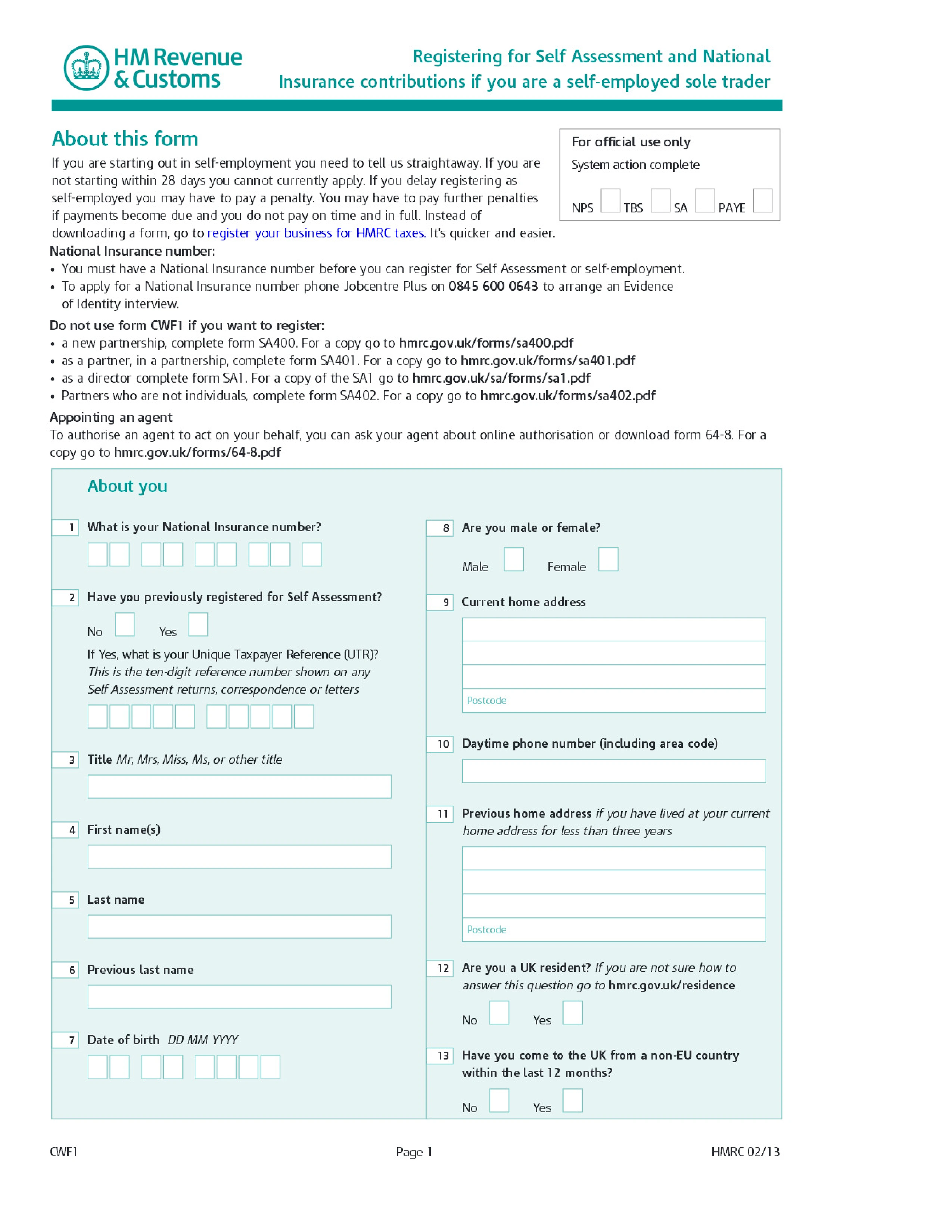
How to Fill Out Form CWF1 (HMRC)
Form CWF1 Instructions, Line by Line
Reviewed by Zendocs Team. Updated 20 November 2026. 12 min read. Based on HMRC Form CWF1 (printed HMRC 02/13) and HMRC guidance on GOV.UK.
Form CWF1
How to Fill It Out
Line-by-line guide with a completed example
Quick answer
- Questions 1 to 13 (About you) are on page 1. The editor highlights the fillable fields.
- You need your National Insurance number before you start.
- Questions 14 to 19 (About your business) and the declaration are on page 2, and they are fillable too.
- Sign and date the form, then print it and post it to HMRC at the address shown on the form.
What you need before you start
Gather these details first, because the form asks for them in this order and an incomplete form takes longer to process.
- Your National Insurance number. The form says you must have one before you can register for Self Assessment or self-employment.
- Your Unique Taxpayer Reference (UTR), only if you have registered for Self Assessment before.
- Your names, date of birth, current home address and daytime phone number with area code.
- Your previous home address, if you have lived at your current address for less than three years.
- Details of your self-employment: the business name if it has one, the sort of work you do, the date it started and the business address if it differs from your home.
If you can sign in to HMRC's service, you can register online instead and save your progress there. Read the GOV.UK registration page to see which route applies to you.
In the Zendocs editor, the highlighted fillable fields cover all 19 questions: questions 1 to 13 on page 1 and questions 14 to 19 on page 2. The declaration on page 2 has a signature box and date boxes too.
Form CWF1 fields at a glance
| Line | What to enter | Required |
|---|---|---|
| Question 1 | Your National Insurance number | Required. The form says you need one before you register |
| Question 2 | Tick No or Yes. If Yes, enter your ten-digit UTR | Required tick. UTR only if you tick Yes |
| Question 3 | Title, for example Mr, Mrs, Miss or Ms | Required |
| Question 4 | First name or names | Required |
| Question 5 | Last name | Required |
| Question 6 | Previous last name | Only if you have used another last name |
| Question 7 | Date of birth as DD MM YYYY | Required |
| Question 8 | Tick Male or Female | Required |
| Question 9 | Current home address with postcode | Required |
| Question 10 | Daytime phone number including area code | Required |
| Question 11 | Previous home address | Only if you have lived at your current address for less than three years |
| Question 12 | Tick Yes or No: are you a UK resident | Required |
| Question 13 | Tick Yes or No: have you come to the UK from a non-EU country within the last 12 months | Required |
| Question 14 | Business name | Leave blank if the business has no name |
| Question 15 | The sort of self-employed work you do | Required |
| Question 16 | Date the self-employment started as DD MM YYYY | Required |
| Question 17 | Tick Yes or No: are you a share fisherman | Required |
| Question 18 | Business address | Leave blank if it is the same as your home address |
| Question 19 | Tick Yes or No: will you do all your work for one person or firm. If Yes, their full name and address | Required tick. Name and address only if Yes |
| Declaration | Your signature and the date as DD MM YYYY | Required |
Step by step
The walkthrough follows the form's own question numbers. Each step says what to enter and why the form asks for it.
Open the form in the editor
Select Get Form on the Form CWF1 page. The editor opens the copy printed HMRC 02/13, with the fillable fields highlighted in light blue. Read the About this form box first: it lists the forms to use instead of CWF1 for a new partnership, a partner, a director and partners who are not individuals.

Questions 1 and 2: National Insurance number and earlier registration
Question 1 asks for your National Insurance number, entered in the boxes one character at a time. The form says you must have this number before you can register, so apply for one first if you do not have it. Question 2 asks whether you have registered for Self Assessment before. Tick No if you have not.
If you tick Yes, enter your UTR, which the form describes as the ten-digit reference number shown on any Self Assessment returns, correspondence or letters. If you tick No, leave the UTR boxes empty, because HMRC issues your UTR after you register.

Questions 3 to 6: your names
Enter your title (Mr, Mrs, Miss, Ms or another title), your first names and your last name. Question 6 asks for a previous last name, so fill it in only if you have used a different last name before. Enter your names in full, because they identify you on the registration.

Questions 7 to 11: date of birth, sex, addresses and phone
Enter your date of birth as day, month and year (DD MM YYYY). Question 8 asks whether you are male or female. Question 9 is your current home address, with the postcode in the last line. Question 10 asks for a daytime phone number including the area code. Question 11 asks for your previous home address only if you have lived at your current home address for less than three years.

Questions 12 and 13: residence
Question 12 asks whether you are a UK resident, and the form points you to HMRC guidance if you are not sure how to answer. Question 13 asks whether you have come to the UK from a non-EU country within the last 12 months. Tick Yes or No for each.

Questions 14 to 19: about your business (page 2)
Page 2 asks for your business name, which you leave blank if the business has none, and the sort of self-employed work you do. It also asks the date the self-employment started, whether you are a share fisherman, and the business address, which you leave blank if it is the same as your home address.
Question 19 asks whether you will do all your work for one person or firm. If you tick Yes, enter their full name and address. The form warns that if you do all your work for one person or firm, you may be an employee. The form also says that if you intend to work as a subcontractor in the construction industry you must register with the Construction Industry Scheme as well, and still fill in the rest of the form.
Scroll down to page 2 in the editor to find these fields. Type in the text boxes and click a box to tick No or Yes.

Sign and date the declaration
The declaration on page 2 says the information you gave is correct and complete to the best of your knowledge and belief, and that you will tell HMRC straight away if your Self Assessment or self-employment circumstances change in a way that affects your answers. Sign in the Signed box and write the date as DD MM YYYY.
If you sign in the Zendocs editor, select Sign in the toolbar. The Add Signature window offers Draw, Image and Type. If you prefer to sign on paper, print the form and sign the printed copy instead.


Print it and send it to HMRC
GOV.UK says to fill in form CWF1, print it and post it to HMRC using the postal address shown on the form. Use the address on the HMRC version you are sending. After HMRC registers you, you usually get your UTR by post in 15 working days, or 21 days if you are abroad, though it may take longer in busy periods. Source: Register for Self Assessment if you are self-employed (GOV.UK).
Form CWF1 examples by situation

First-time registration
- Question 1: National Insurance number entered in the boxes
- Question 2: No ticked, UTR boxes left empty
- Questions 3 to 5: title Ms, first names Jane Anne, last name Sample
- A person who has never registered has no UTR yet, so only the No box is ticked.

Registered for Self Assessment before
- Question 1: National Insurance number entered in the boxes
- Question 2: Yes ticked
- UTR: ten digits entered in the two UTR boxes
- The form asks for the UTR only when Yes is ticked at question 2.

Moved in the last three years
- Question 9: current home address with postcode
- Question 10: daytime phone number with area code
- Question 11: previous home address and postcode
- The form asks for a previous address if you have lived at your current address for less than three years.
Completed Form CWF1 example

Sample for illustration only. Not a real form. Do not submit.
If a field does not apply
Some questions are only for certain people. Leave these empty instead of writing a placeholder.
- Question 2, UTR boxes: leave empty if you tick No.
- Question 6, previous last name: leave empty if you have never used a different last name.
- Question 11, previous home address: leave empty if you have lived at your current address for three years or more.
- Question 14, business name: leave the box blank if the business does not have a name.
- Question 18, business address: leave the box blank if it is the same as your home address.
- Question 19, name and address: complete them only if you tick Yes.
Common Form CWF1 mistakes and how to avoid them
The errors that cost the most time on this form are using it for the wrong kind of registration, starting without a National Insurance number and posting it late or to the wrong address. Each item below says how to avoid the problem.
Using CWF1 for a partnership or as a director
It happens because every registration form looks similar. The form's own Do not use box lists SA400 for a new partnership, SA401 for a partner, SA1 for a director and SA402 for partners who are not individuals. Using CWF1 for these cases means the registration has to be done again on the right form. Read that box before you fill in question 1.
Starting without a National Insurance number
The form says you must have a National Insurance number before you can register for Self Assessment or self-employment. Leaving question 1 empty means the form cannot be processed as it stands. Get the number first, then complete the form.
Entering a UTR you do not have
Question 2 only asks for a UTR if you have registered before. People sometimes copy a number from another letter or a tax code. Tick No and leave the UTR boxes empty if you have never registered, and check the ten digits against an earlier Self Assessment letter if you tick Yes.
Posting the form to an address from an old source
Addresses change, and copies of this form circulate for years. GOV.UK tells you to post the form using the postal address shown on the form. Check the address on the HMRC version you are sending before you post it.
Registering late
GOV.UK says you must tell HMRC by 5 October if you need to complete a tax return for the previous tax year and have not sent one before. If you register after 5 October and do not pay all your tax by 31 January, you may get a failure to notify penalty. Register as soon as you know you need to. Sources: Deadlines and Penalties.
Paper vs online
GOV.UK describes two routes. You can register online by signing in, and you can save your progress and come back later. If you cannot register online, you fill in form CWF1, print it and post it to HMRC. You cannot register online if you do not live in the UK. Source: Register for Self Assessment if you are self-employed (GOV.UK).
Final checklist
Check these points before you print the form.
- You have a National Insurance number and entered it in question 1.
- Question 2 is ticked, with a UTR only if you ticked Yes.
- Your names, date of birth, home address and phone number with area code are complete.
- Question 11 is filled in if you have lived at your address for less than three years.
- Questions 14 to 19 on page 2 are completed. Question 18 is blank only if your business address is the same as your home address.
- The declaration is signed and dated.
- You know the postal address shown on the HMRC version you are sending.
Where to send it
GOV.UK says to print the completed form and post it to HMRC using the postal address shown on the form. Do not copy an address from another website. After HMRC registers you, your UTR usually arrives by post in 15 working days, or 21 days if you are abroad. Source: Register for Self Assessment if you are self-employed (GOV.UK).
Official instructions
These HMRC pages on GOV.UK are the source for the facts in this guide.