How to Fill Out Form P87 (2026)
Form P87 Instructions, Line by Line
Reviewed by Zendocs Team. Updated 27 November 2026. 21 min read. Based on Form P87 (HMRC 06/26) and HMRC's guidance notes for form P87.
Form P87
How to Fill It Out
Line-by-line guide with a completed example
Quick answer
- Use Form P87 only if your allowable expenses are £2,500 or less for the tax year.
- One column (A to E) is one tax year: the current year and up to the last 4 completed years.
- Section 2 needs your employer's PAYE reference. HMRC rejects the form without it.
- Flat rate expenses need no receipts. Other expenses need evidence.
- Car and van mileage is 55p for the first 10,000 miles after 6 April 2026, then 25p.
- Working from home relief is not available for the 2026 to 2027 tax year.
- Total each year in Section 9, then sign and date the declaration on page 7.
- Post all 8 pages to HMRC at BX9 1AS and keep a copy.
What you need before you start
Gather these before you open Form P87. HMRC says forms received without the mandatory details (the boxes marked with an asterisk) will be rejected, so it is quicker to have everything to hand. Form P87 (HMRC 06/26)
- Your surname, first names, address with postcode, date of birth and National Insurance number if you have one (Section 1).
- For every employer and tax year you claim for: the employer's PAYE reference number. HMRC's notes say it is on your P45 or P60, in your Personal Tax Account or in the HMRC app. Guidance notes for form P87
- Your job title, the employer's name, address and postcode, and the type of industry if you claim flat rate expenses (Section 2).
- The tax years you are claiming for. The form takes the current tax year and up to the last 4 completed tax years, one in each column A to E.
- What you paid for each expense, and anything your employer or anyone else paid back.
- The evidence for each type of expense: receipts, mileage logs or proof that you must work from home. A flat rate expense needs no evidence. GOV.UK: claim by post
- Confirmation that the total for each tax year is £2,500 or less. Above that you need a Self Assessment tax return instead. GOV.UK: claim by post
Form P87 fields at a glance
| Line | What to enter | Required |
|---|---|---|
| Section 1 (1.1 to 1.7) | Title, surname, first names, address, postcode, phone, date of birth, National Insurance number | Surname, first names, address and date of birth are mandatory. National Insurance number if you have one |
| Section 2 (2.1 to 2.7) | Year ending 5 April, employer PAYE reference, job title, employer name and address, industry, employee number | PAYE reference is mandatory. Industry only for flat rate expenses |
| Section 3 (3.1) | Flat rate expense deduction for your job | Only if you claim a flat rate. No receipts needed |
| Section 4 (4.1 to 4.4) | Professional body, subscription or fee, amount repaid, expenses claimed | Receipts. The body must be on HMRC's approved list |
| Section 5 (5.1 to 5.13) | Business miles, rates, maximum tax-free amount, employer mileage payments | Mileage log. 5.11 to 5.13 required if you filled in 5.6, 5.8 or 5.10 |
| Section 6 (6.1 to 6.5) | Hotel and meal expenses | Receipts showing the date and the hotel or restaurant name |
| Section 7 (7.1 to 7.4) | Other expenses, such as parking, tools or company car fuel | A list of expenses and receipts or other evidence |
| Section 8 (8.1 and 8.2) | Other amounts repaid to you that you have not already declared | Leave blank if none |
| Section 9 (9.1) | Total net allowable expenses for each tax year | Completed for every claim. £2,500 or less per year |
| Section 10 (10.1 to 10.6) | Whether the cheque is payable to you or a nominee | Nominee details only if you choose a nominee |
| Declaration (page 7) | Full name, signature and date | Signed and dated. Not a future date |
Step by step
These steps follow the HMRC 06/26 edition of Form P87 as it opens in the Zendocs editor. The screenshots use made-up details, and the amounts are examples, not advice about your own claim.
Open the form and check the edition
Open Form P87 in the editor and look at the foot of page 1: it should read HMRC 06/26. HMRC says it rejects postal claims that do not use form P87. Check that the edition printed on page 1 matches the current form on GOV.UK. GOV.UK: claim by post
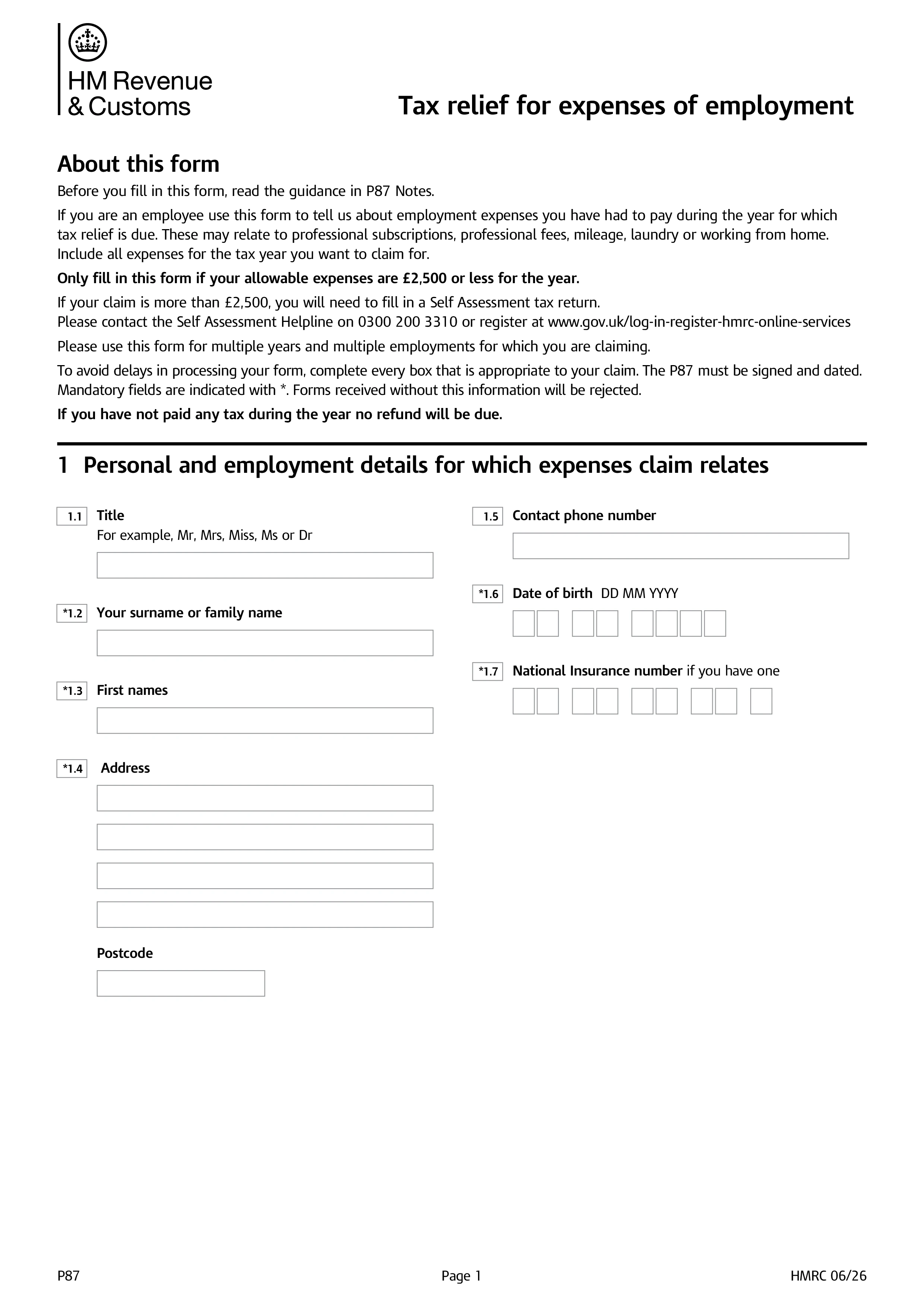
The form has 10 sections on 8 pages. Most sections are tables with five columns, A to E. Each column is one tax year, and you only enter data in the columns for the years you claim. The fillable boxes are highlighted blue in the editor. Page 1 also tells you to read the guidance notes first. Form P87 (HMRC 06/26)

Section 1: your personal details
Enter your title (optional), surname (1.2), first names (1.3), address and postcode (1.4), contact phone number (1.5), date of birth (1.6) and National Insurance number (1.7). Boxes 1.2, 1.3, 1.4 and 1.6 are marked as mandatory, and 1.7 is mandatory if you have a number.
The date of birth boxes take one digit each in the order day, month, year. HMRC's notes describe a National Insurance number as 2 letters, 6 numbers and 1 letter, for example QQ123456A, and say that HMRC cannot process the form without this information. Guidance notes for form P87 The screenshot leaves the phone number, date of birth and National Insurance number empty.

Section 2: employment details
Complete one column for each tax year. Type the last two digits of the year in "Year ending 5 April 20__" (27 for the year ending 5 April 2027), then enter the employer's PAYE reference (2.1), your job title (2.2), the employer's name (2.3), the first line of the address (2.4) and the postcode (2.5). Enter the employee number (2.7) if you have one.
The PAYE reference is the one that identifies the employer, and HMRC says it will reject the form without it. The form shows the layout with the example 123 A246. Type of industry (2.6) is only needed when you claim flat rate expenses. Form P87 (HMRC 06/26)
If you claim several years for the same employment, HMRC's notes say you only enter the employment details on the first year. If you worked for more than one employer in a tax year, put each employment in its own column. If you need more than five columns, use a separate form. Guidance notes for form P87

Section 3: flat rate expenses
Enter the agreed fixed amount for your job in box 3.1, for example £60. Flat rate expenses cover the upkeep of work equipment, uniforms with logos and specialist clothing, including washing them. HMRC's notes say you do not need records or receipts for a flat rate claim, and you do not need to make annual claims. Guidance notes for form P87
To find your amount, check your industry and job in HMRC's list; if your job is not listed, GOV.UK says you can claim a flat rate expense of £60. If your employer pays part of the cost, deduct what they pay. If you want to claim more than the flat rate, use Section 7 and send receipts instead. GOV.UK: flat rate expenses
The screenshot shows Section 3 empty, because the example claim in this guide uses actual expenses rather than a flat rate.

Section 4: subscriptions to professional bodies
Enter the name of the professional body (4.1), the amount of the subscription or fee (4.2), any amount repaid to you (4.3) and the expenses claimed (4.4). Box 4.4 must equal 4.2 minus 4.3. Leave 4.3 blank if nobody repaid you: HMRC's notes ask you not to add zeros. Guidance notes for form P87
Only fees for your profession and subscriptions to bodies on HMRC's approved list qualify, and HMRC says it will reject claims for bodies that are not on the list. You cannot claim life membership subscriptions, or fees your employer paid. Send copies of receipts that show how much you paid. GOV.UK: professional fees and subscriptions

Section 5: mileage allowance
Use this section when you used your own car, van, motorcycle or cycle for business journeys. Only business miles count: HMRC's notes say you cannot claim for miles between your home and a permanent workplace. Guidance notes for form P87
- Cars and vans, lines 5.1 to 5.6: enter total business mileage (5.1), the miles up to the first 10,000 (5.2) and multiply them by the relevant rate (5.3). Enter the miles over 10,000 (5.4) and multiply them by 25p (5.5). Box 5.6 is 5.3 plus 5.5.
- Motorcycles and cycles: enter miles (5.7 and 5.9) and multiply by 24p (5.8) or 20p (5.10).
- Mileage allowance relief, lines 5.11 to 5.13: 5.11 is 5.6 plus 5.8 plus 5.10, 5.12 is what your employer paid you for mileage, and 5.13 is 5.11 minus 5.12. You must complete this section whenever you filled in 5.6, 5.8 or 5.10.
For cars and goods vehicles the rate in 5.3 is 55p per mile for the first 10,000 business miles for periods after 6 April 2026, and 45p for periods up to and including 5 April 2026. The rate after 10,000 miles is 25p, motorcycles are 24p and cycles are 20p. GOV.UK: vehicles you use for work
HMRC asks for a mileage log with the reason for every journey and the start and end postcodes. The notes add that if your employer pays more than these rates you pay tax on the excess, and that a letter from your employer is needed if they paid nothing towards your mileage. Guidance notes for form P87
Worked example (made-up amounts). Jane drives 4,000 business miles in her own car in 2026 to 2027. Box 5.1 is 4,000 and 5.2 is 4,000. Box 5.3 is 4,000 x £0.55 = £2,200, so 5.6 and 5.11 are £2,200. Her employer paid her £1,000, which goes in 5.12, so 5.13 is £2,200 minus £1,000 = £1,200. At a tax rate of 20% the relief is £240, not the £1,200 itself.


Sections 6 and 7: hotel, meals and other expenses
In Section 6 enter where you stayed (6.1), the amount spent on allowable items (6.2), the date or number of overnight stays (6.3), any amount repaid (6.4) and the total (6.5, which is 6.2 minus 6.4). HMRC may allow accommodation, meals and business phone calls in hotels, but not newspapers, bar bills, personal phone calls or laundry. Receipts must show the date of the stay or meal and the name of the hotel or restaurant. For frequent business trips, give the total spent for the year. Guidance notes for form P87
Section 7 is for expenses that do not belong anywhere else. Describe the expense (7.1), the amount (7.2), any amount repaid (7.3) and the total (7.4, which is 7.2 minus 7.3). An expense must be one that every holder of the job would necessarily, wholly and exclusively pay to do it. Parking and tolls on a business journey belong here, but not on your ordinary commute. Guidance notes for form P87
- Company car fuel: claim the actual fuel cost, not mileage rates, attach a summary of your calculation and copies of the fuel receipts.
- Tools: attach receipts.
- Working from home: GOV.UK says you cannot claim for the 2026 to 2027 tax year, but you can still claim for the 4 previous tax years if you must work from home. Choosing to work from home does not qualify. GOV.UK: working from home
The example screenshot claims £120 for two nights in a hotel in Section 6 (made-up amount) and leaves Section 7 empty.

Sections 8 and 9: money repaid to you and your total
Section 8 is for amounts you received that you have not already declared elsewhere on the form, so for most claims it stays empty. Section 9 must be completed for every claim. Box 9.1 is boxes 3.1 + 4.4 + 5.13 + 6.5 + 7.4 minus 8.2, worked out for each tax year. Guidance notes for form P87
In the example the total is 0 + £150 + £1,200 + £120 + £0 minus £0 = £1,470. HMRC says that if a tax year comes to more than £2,500 you need a Self Assessment tax return for it, and if you claim for more than one employment the total for the year is the combined amount. Page 6 of the form words the limit as "less than £2,500", while page 1, the notes and GOV.UK say "£2,500 or less". GOV.UK: claim by post

Section 10: how you want to be paid
If you are owed a refund, the form offers payment by cheque. In 10.1 choose whether the cheque is payable to you (the first box) or to a nominee. If you choose a nominee, answer 10.2, and give the nominee's name (10.4), customer reference if they have one (10.5, which cannot be a National Insurance number) and full address with postcode (10.6). HMRC will send you a tax calculation that says how it will repay you. Guidance notes for form P87
Cheques can only be paid into an account in your name or your nominee's name, and HMRC cannot repay a nominee by Bacs. A professional nominee who charges a fee must be registered with HMRC for an Agent Services Account and give an Agent Reference Number in 10.3. GOV.UK: receive repayments on behalf of others

Sign and date the declaration
On page 7, enter your full name, your signature and the date as day, month and year. The declaration says the information is true and complete to the best of your knowledge, and that giving false information could lead to prosecution. Form P87 (HMRC 06/26) HMRC's notes say it will not process forms signed with a future date. Guidance notes for form P87
The editor's Sign button opens a dialog with Draw, Image and Type options for adding a signature to the form. HMRC's own instruction is to complete the form on screen, print it and post it, so check the GOV.UK page before you send. GOV.UK: claim by post


Print the form, add your evidence and post it
HMRC recommends printing an extra copy to keep, because it may write to you for more information. Form P87 (HMRC 06/26) Send all 8 pages. The notes say to attach documents only where the notes ask for them, to wait until you have them all before posting, and that you do not need a covering letter. Guidance notes for form P87
The evidence HMRC lists on GOV.UK depends on the expense: copies of receipts for each professional fee or subscription; receipts for exact uniform, work clothing or tool costs (none for a flat rate); mileage logs showing the reason, start postcode and end postcode of every journey; hotel and meal receipts showing the date and the hotel or restaurant name; for working from home, evidence that you must work from home, such as your contract; and for other expenses, a list of them and the employments, with receipts. GOV.UK: claim by post
Page 8 of the form says not to send paperwork unless you claim company car fuel or unreimbursed mileage. The guidance notes and GOV.UK ask for evidence for other expenses as well, so read them before you post the claim.
Form P87 examples by situation

Flat rate expense for a food worker
- Line 2.1: the employer's PAYE reference (the one shown is made up)
- Line 2.6: Food, because the industry is required for a flat rate claim
- Line 3.1: £60
- Why: GOV.UK's list gives £60 for all workers in the food industry, and a flat rate claim needs no receipts.

Own car, two mileage rates
- Lines 5.1 and 5.2: 12,000 business miles, with 10,000 in the first band
- Line 5.3: 10,000 x 55p = £5,500, and line 5.5: 2,000 x 25p = £500
- Line 5.6: £6,000. If the employer paid £4,000, line 5.13 is £2,000 (made-up amount)
- Why: the 55p rate applies to the first 10,000 miles and 25p after that, so the form splits the mileage before adding it up.

Professional subscription
- Line 4.1: the approved professional body (a made-up name)
- Line 4.2: £180.00, the amount you paid
- Line 4.4: £180.00, because 4.3 is blank when nobody repaid you
- Why: the body must be on HMRC's approved list, and the receipt showing the amount you paid goes with the claim.

Two employers in the same tax year
- Column A: the first employer, year ending 27, with its own PAYE reference
- Column B: the second employer, also year ending 27, with its own PAYE reference
- Lines 2.2 to 2.5: job title, employer name, address and postcode for each
- Why: each employment goes in its own column, but the total for the tax year across both must still be £2,500 or less.
Completed Form P87 example

Sample for illustration only. Not a real form. Do not submit.
If a field does not apply
Leave it blank. HMRC's guidance notes ask for the following on the form: Guidance notes for form P87
- Do not add zeros, strike through boxes or write "not applicable" or "N/A" if you have nothing to enter.
- Do not use arrows or ditto marks to show data is the same as another box. Repeat the data in each box.
- Only enter data in the columns for the tax years you claim, from A to E.
- Type of industry (2.6) is only needed for flat rate expenses.
- Complete the mileage allowance relief boxes (5.11 to 5.13) only when you filled in 5.6, 5.8 or 5.10.
- Do not write outside the boxes: HMRC says it delays the claim.
Common Form P87 mistakes and how to avoid them
Delays on this form mostly come from missing mandatory details such as the employer's PAYE reference, expenses HMRC does not allow, and evidence that is missing or incomplete. Each item below says why it happens, what it causes and how to avoid it.
Leaving out the employer's PAYE reference
The reference is not on every payslip, so it is easy to skip. HMRC's notes say it will reject the form without it. Look on your P45 or P60, in your Personal Tax Account or in the HMRC app before you start.
Claiming something HMRC does not allow
People often claim everyday costs. You cannot claim travel between home and a permanent workplace, the initial cost of work clothing, everyday clothing even if it must be a certain colour, personal protective equipment, or anything your employer paid back in full. Claim only the part your employer did not pay. GOV.UK: job expenses
Claiming working from home for 2026 to 2027
Older advice still says you can claim £6 a week. GOV.UK says you cannot claim working from home relief for the tax year 6 April 2026 to 5 April 2027, although you can still claim for the 4 previous tax years if you had to work from home. Claiming it for the current year leads to a claim that cannot be paid. GOV.UK: working from home
Using the wrong mileage rate
The 45p rate for the first 10,000 miles is still widely quoted. For periods after 6 April 2026 the rate is 55p, and 45p applies to periods up to and including 5 April 2026. Using the wrong rate in 5.3 gives a wrong total in 5.6 and every box after it, so check the date of each journey against the notes. Guidance notes for form P87
Sending no evidence, or the wrong evidence
The evidence depends on the expense, so it is easy to send the wrong thing. A mileage log needs the reason and the start and end postcodes of every journey, and hotel and meal receipts need the date and the name of the hotel or restaurant. Use the list in step 11 as a checklist. GOV.UK: claim by post
Claiming a professional body that is not on the approved list
A body can sound official without being approved. HMRC says it will reject claims for professional subscriptions if the body is not on its list. Check the list on GOV.UK before you add the subscription in Section 4. GOV.UK: professional fees and subscriptions
Adding zeros, N/A, arrows or writing outside the boxes
These look tidy but they are the habits HMRC's notes ask you to avoid, and writing outside the boxes delays the claim. Leave unused boxes empty and repeat data instead of using ditto marks.
Signing with a future date or sending part of the form
HMRC says it will not process forms signed with a future date, and its notes say to send all 8 pages. Date the declaration on the day you sign it, print every page, and check you have the whole form before posting. Guidance notes for form P87
Boxes that do not add up
The notes say that 4.4 must equal 4.2 minus 4.3, 6.5 must equal 6.2 minus 6.4 and 7.4 must equal 7.2 minus 7.3. A wrong total in one box carries into 9.1, so work the arithmetic section by section and check Section 9 last.
Claiming more than £2,500 for a tax year on P87
Large mileage claims can pass the limit without anyone noticing, particularly when you claim for more than one employment, because the total for the year is combined. If a year comes to more than £2,500, HMRC says you need a Self Assessment tax return for that year. GOV.UK: claim by post
If your expenses change after you claim
GOV.UK says that if you claimed an estimated amount and the actual amount you spent is different at the end of the tax year, you must tell HMRC. You must send evidence of what you spent and either submit a new claim online or complete a postal form. If you spent less than you estimated, you can also tell HMRC by phoning the helpline. GOV.UK: job expenses overview
Final checklist
Run through this list before you print and post the form.
- Page 1 shows HMRC 06/26, and you are claiming £2,500 or less for each tax year.
- Every mandatory box (marked *) is filled in, including the employer's PAYE reference for each tax year.
- You only entered data in the columns for tax years you are claiming.
- The mileage rate matches the date of the journeys, and 5.11 to 5.13 are completed where needed.
- 4.4, 6.5 and 7.4 match their sums, and 9.1 adds up for each year.
- There are no zeros, N/A, arrows, ditto marks or writing outside the boxes.
- You attached the evidence for each expense type except flat rate expenses.
- You signed the declaration and dated it with a date that is not in the future.
- You printed all 8 pages and kept a copy.
Where to send it
Send the completed and signed form, with the evidence the notes ask for, by post to: Pay As You Earn and Self Assessment, HM Revenue and Customs, BX9 1AS. Form P87 (HMRC 06/26)
GOV.UK describes this as the postal route and says postal claims must use form P87. HMRC also runs an online service for job expenses claims; this guide covers the postal form only. GOV.UK: claim by post HMRC online service
Official instructions
These are the HMRC pages this guide is based on, all opened while it was written.
- Form P87, Tax relief for expenses of employment (HMRC 06/26)
- Guidance notes for form P87
- GOV.UK: claim tax relief for your job expenses by post
- GOV.UK: claim tax relief for your job expenses
- GOV.UK: vehicles you use for work and approved mileage rates
- GOV.UK: uniforms, work clothing and tools flat rate expenses
- GOV.UK: professional fees and subscriptions
- GOV.UK: travel and overnight expenses
- GOV.UK: working from home
- GOV.UK: Self Assessment tax returns