How to Fill Out Form SA1 (HMRC 12/11)
Form SA1 Instructions, Line by Line
Reviewed by Zendocs Team. Updated 26 November 2026. 13 min read. Based on Form SA1 (HMRC 12/11), Registering for Self Assessment and getting a tax return, and HMRC guidance on GOV.UK.
Form SA1
How to Fill It Out
Line-by-line guide with a completed example
Quick answer
- About you: title, surname, first names, and a previous surname with its date only if your name changed.
- Date of birth, then your previous UTR only if you were in Self Assessment before.
- Address, postcode and a daytime phone number.
- National Insurance number, or your reasons if you believe you do not need a UK number.
- Page 2: tick every reason you need a tax return and enter the date for each.
- Any other reason: give details and the date it applies from.
- Sign and date the declaration, then send the form to HMRC.
What you need before you start
Form SA1 is short, but each line needs an exact detail. Gather these first so you can fill in the form in one sitting.
- Your National Insurance number (NINO). The form says you must get one before you can register for Self Assessment.
- Your previous UTR, if you have one. It is the ten-digit reference in the top left-hand corner of page 1 of an earlier tax return. If you have never been in Self Assessment, you have none.
- The date each reason started. For example the day you became a company director, or the day rental income began.
- Your address, postcode and a daytime phone number.
- A check that SA1 is the right form. If you are self-employed, the form says to use CWF1 instead. If you are unsure whether you need a tax return, use the GOV.UK check tool.
GOV.UK also offers an online registration service as the other way to register for the first time. Registering for the first time
Form SA1 fields at a glance
| Line | What to enter | Required |
|---|---|---|
| Title | MR, MRS, MISS, MS or another title | Asked for on the form |
| Surname or family name | Your surname, in capital letters | Asked for on the form |
| First name(s) | Your first names, in capital letters | Asked for on the form |
| Previous surname | Your earlier surname | If applicable |
| Date of name change | The date the name changed, DD MM YYYY | If applicable |
| Your date of birth | Day, month and four-digit year, DD MM YYYY | Marked: take particular care |
| Previous UTR | The ten-digit reference from an earlier tax return | If you were in Self Assessment before |
| Your address | Your address on the lines provided | Asked for on the form |
| Postcode | First part in the left boxes, second part in the right boxes | Asked for on the form |
| Your daytime contact phone number | A number HMRC can use in the daytime | Asked for on the form |
| Your National Insurance number (NINO) | Two letters, six digits and a final letter | Marked: take particular care |
| Reasons for no NINO | Why you believe you do not need a UK NINO | Only if you believe you do not need one |
| Why do you need to complete a tax return? | Tick each reason that applies and enter its date | You must complete this section |
| Any other reason | Details, and the date it applies from | If no box fits |
| Signature and Date | Sign and date the declaration | You must sign and date it |
Step by step
The screenshots use made-up sample data. Use your own details on the real form.
Open the form and use capital letters
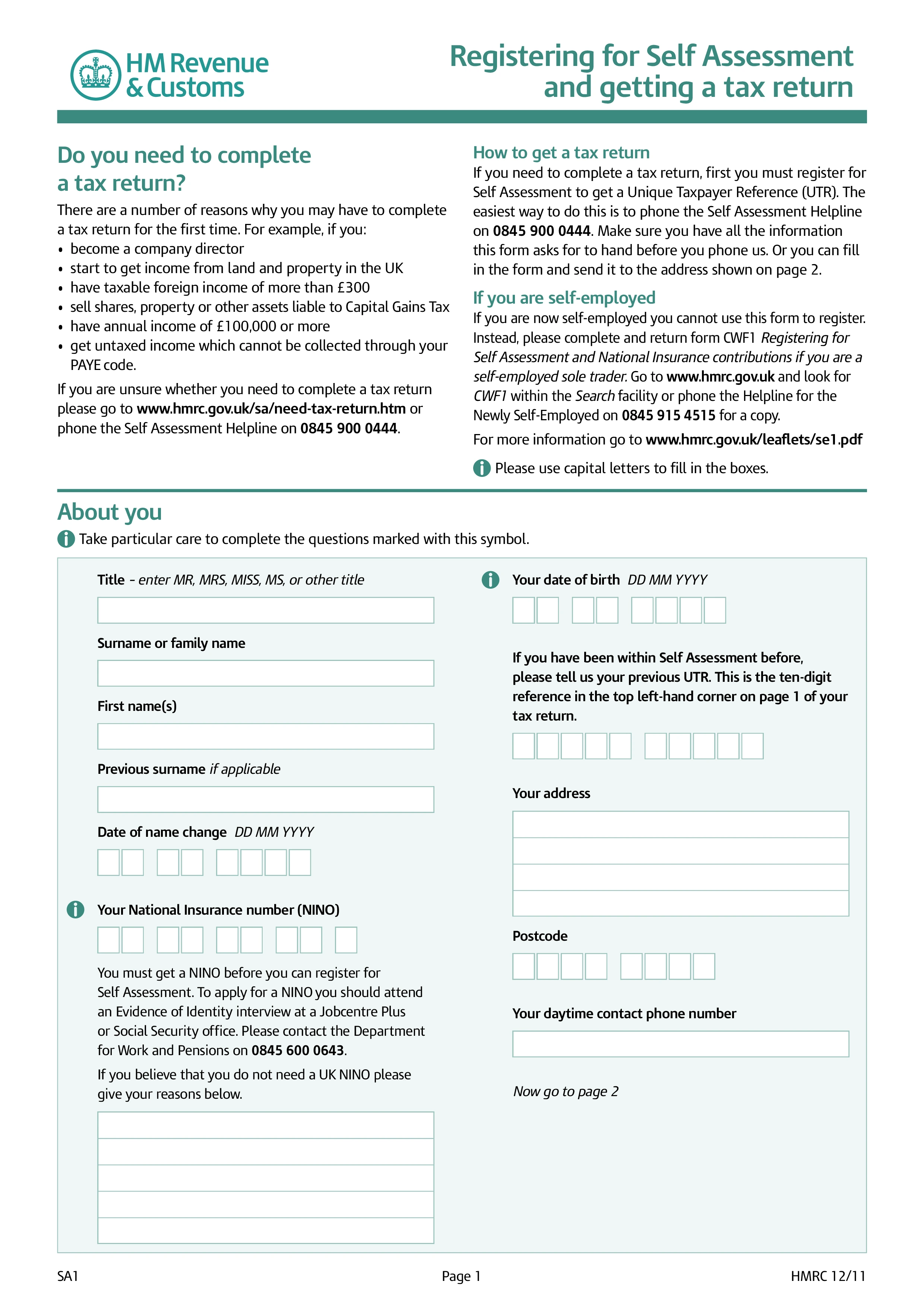
Open Form SA1 in the editor. Page 1 starts with a short guide to who needs a tax return and then the About you boxes. The form asks you to use capital letters in the boxes, so type in capitals. If you are now self-employed, stop here: the form says you cannot use it and should complete form CWF1 instead.
Page 1 also suggests phoning the Self Assessment helpline. This version prints 0845 900 0444, so check the current number on GOV.UK before you call.

Enter your name
Type your title (MR, MRS, MISS, MS or another title), then your surname or family name and your first name(s). If you have used a different surname, enter it under Previous surname and the date it changed under Date of name change, as DD MM YYYY. If your name has not changed, leave both empty.
These lines set the name your registration is recorded under. The two previous-name lines are marked "if applicable", so a blank is correct when nothing changed. In the screenshot, MS SAMPLE, JANE A and a previous surname of EXAMPLE are made-up values.

Enter your date of birth and previous UTR
Enter your date of birth as two digits for the day, two for the month and four for the year. The form marks this line with its "take particular care" symbol, so check each digit.
If you have been within Self Assessment before, enter your previous UTR, the ten-digit reference in the top left-hand corner of page 1 of your tax return. If this is your first registration, leave the boxes empty: HMRC issues your UTR after you register. Registering for the first time

Enter your address, postcode and phone number
Write your address on the lines provided. The postcode has two groups of boxes: put the first part in the left group and the second part in the right group. Then add a daytime contact phone number.
Use the address where you want to receive post from HMRC. The address and number in the screenshot are made up.

Enter your National Insurance number
Enter your NINO in the boxes: two letters, then six digits in three pairs, then one final letter. The form marks this line with its "take particular care" symbol.
The form says you must get a NINO before you can register for Self Assessment. If you believe you do not need a UK NINO, write your reasons in the box below the number. The number in the screenshot is a made-up sample.

Say why you need a tax return
On page 2, tick every reason that applies and enter its date as DD MM YYYY. The reasons printed on this version are: I became a company director (date you became one), income from land and property in the UK, taxable foreign income in excess of £300 a year, annual income from a trust or settlement, annual income that will exceed £100,000, untaxed income that cannot be collected through your PAYE tax code, and Capital Gains Tax to pay.
The form says you must complete this section. For Capital Gains Tax the form prints 05 04 for the tax year ending, so you add the year. The £300 and £100,000 figures come from this 12/11 version, so check the current rules on GOV.UK before you rely on them.

Give any other reason
If none of the boxes covers your situation, write the details in the Any other reason box and enter the date it applies from. GOV.UK lists being asked by HMRC to send a return as one of the situations where you must send one. Who must send a tax return
The text and date in the screenshot are made-up examples of how a reason can be worded.

Sign and date the declaration
The declaration says the information on the form is complete and correct to the best of your knowledge and belief, and that you will tell HMRC straightaway if your circumstances or plans change in a way that affects your answers. The form says you must sign and date it.
In the Zendocs editor, the Sign button opens an Add Signature window with three options: Draw, Image and Type. Whichever you use, follow the form's instruction to sign and date. If you are unsure what HMRC wants on a posted form, ask HMRC on 0300 200 3310.


Form SA1 examples by situation

New landlord with UK rental income
- Reasons: tick "I have been getting income from land and property in the UK".
- Date: 01 05 2025, a made-up date the rental income started.
- Page 1: complete About you as normal and leave Previous UTR empty if you have never been in Self Assessment.
- Why: the form lists land and property income as a reason and asks for the date the income started.

Newly appointed company director
- Reasons: tick "I became a company director".
- Date: 01 09 2025, a made-up date the directorship began.
- Other boxes: leave the reasons you do not have unticked and their dates empty.
- Why: the form lists becoming a director as a reason and asks for the date you became one.

Taxable foreign income
- Reasons: tick "I have been getting taxable foreign income in excess of £300 a year".
- Date: 01 07 2025, a made-up date the income started.
- Check the figure: £300 is printed on this version of the form, so check GOV.UK for the current rules.
- Why: the form asks for the date the foreign income started, and the amount is the one printed on the form.
Completed Form SA1 example

Sample for illustration only. Not a real form. Do not submit.
If a field does not apply
Some lines apply only to some people. Leave these empty rather than writing a dash or "none":
- Previous surname and Date of name change: leave empty if your name has not changed.
- Previous UTR: leave empty if you have never been in Self Assessment.
- The no-NINO reasons box: leave empty if you have a National Insurance number.
- Reasons that do not apply: leave the box unticked and the date empty.
- Any other reason: leave empty if one of the printed reasons covers you.
Common SA1 mistakes and how to avoid them
Most SA1 problems come from using the wrong form or leaving out a part the form says you must complete. Check these before you send the form.
Using SA1 when you are self-employed
People see "Self Assessment" in the title and assume the form is for them. Page 1 says that if you are now self-employed you cannot use it. You may end up on a route that does not fit your situation. Read the box on page 1 before you start and use form CWF1 if it applies.
Leaving the reasons section empty
It is easy to skip page 2 when page 1 looks complete. The form says you must complete the reasons section, so an empty one means HMRC cannot see why you need a tax return. Tick every reason that applies, or use the Any other reason box.
Ticking a reason but not entering its date
The ticks and dates sit in different boxes, so one is often missed. The form asks for the date each reason started, so a tick without a date is an incomplete answer. After each tick, check that the date boxes beside it are filled.
Skipping the National Insurance number
Some people do not have their number to hand. The form says you must get a NINO before you can register for Self Assessment, so a missing number can hold up the registration. Find your number first, or write your reasons in the box if you believe you do not need a UK NINO.
Writing in lower case
Most people type the way they normally write. The form asks you to use capital letters in the boxes. Type in capitals so every box reads clearly.
Forgetting to sign and date the declaration
The signature box is at the very end of page 2, after the reasons. The form says you must sign and date the declaration, so an unsigned form is incomplete. Sign, add the date as DD MM YYYY, and look at the page once more before you send it.
Registering after the deadline
People often wait until they have income to report. GOV.UK says to tell HMRC by 5 October 2026 if you need to send a return for 2025 to 2026 and have not sent one before. If you register after that date, HMRC sets a new deadline, and a failure to notify penalty can apply if you do not pay in full by 31 January. Self Assessment penalties
Changing details after you send Form SA1
The declaration says you will tell HMRC straightaway if your circumstances or plans change in a way that affects the answers on the form. If you spot a mistake after you have sent it, contact HMRC on the Self Assessment helpline, 0300 200 3310. Self Assessment contact details
If you later stop needing to send returns, tell HMRC promptly: a late notification can lead to a penalty. If you no longer need to send a tax return
Paper vs online
GOV.UK gives two ways to register for the first time, and the details differ.
- Online service: sign in through GOV.UK, creating sign-in details on your first visit. You can save your progress. Your UTR should appear in your personal tax account within 72 hours. You cannot register online if you do not live in the UK.
- Form SA1 by post: complete the form and post it to the address shown on the form. Your UTR usually arrives within 15 working days, or 21 days if you are abroad, and it can take longer in busy periods.
Source: Registering for the first time.
Final checklist
Run through this list before you send the form.
- You are not self-employed. If you are, use form CWF1.
- Everything is in capital letters.
- Your date of birth and National Insurance number are correct.
- Previous UTR is filled in only if you were in Self Assessment before.
- Every reason that applies is ticked and has a date.
- The declaration is signed and dated.
- You know the address you are posting to (see below).
- You have noted the 5 October deadline for the tax year in question.
Where to send it
GOV.UK says to post a completed form SA1 to HMRC at the address shown on the form. Registering for the first time The 12/11 version prints this address on page 2: Central Agent Authorisation Team, National Insurance Contributions Office, Benton Park View, Newcastle upon Tyne NE98 1ZZ. Because the printed revision is 12/11, confirm the address with HMRC before you post.
Questions: the Self Assessment helpline is 0300 200 3310 (Monday to Friday, 8am to 6pm; from outside the UK +44 161 931 9070). Self Assessment contact details
Official instructions
These are the official pages this guide relies on.