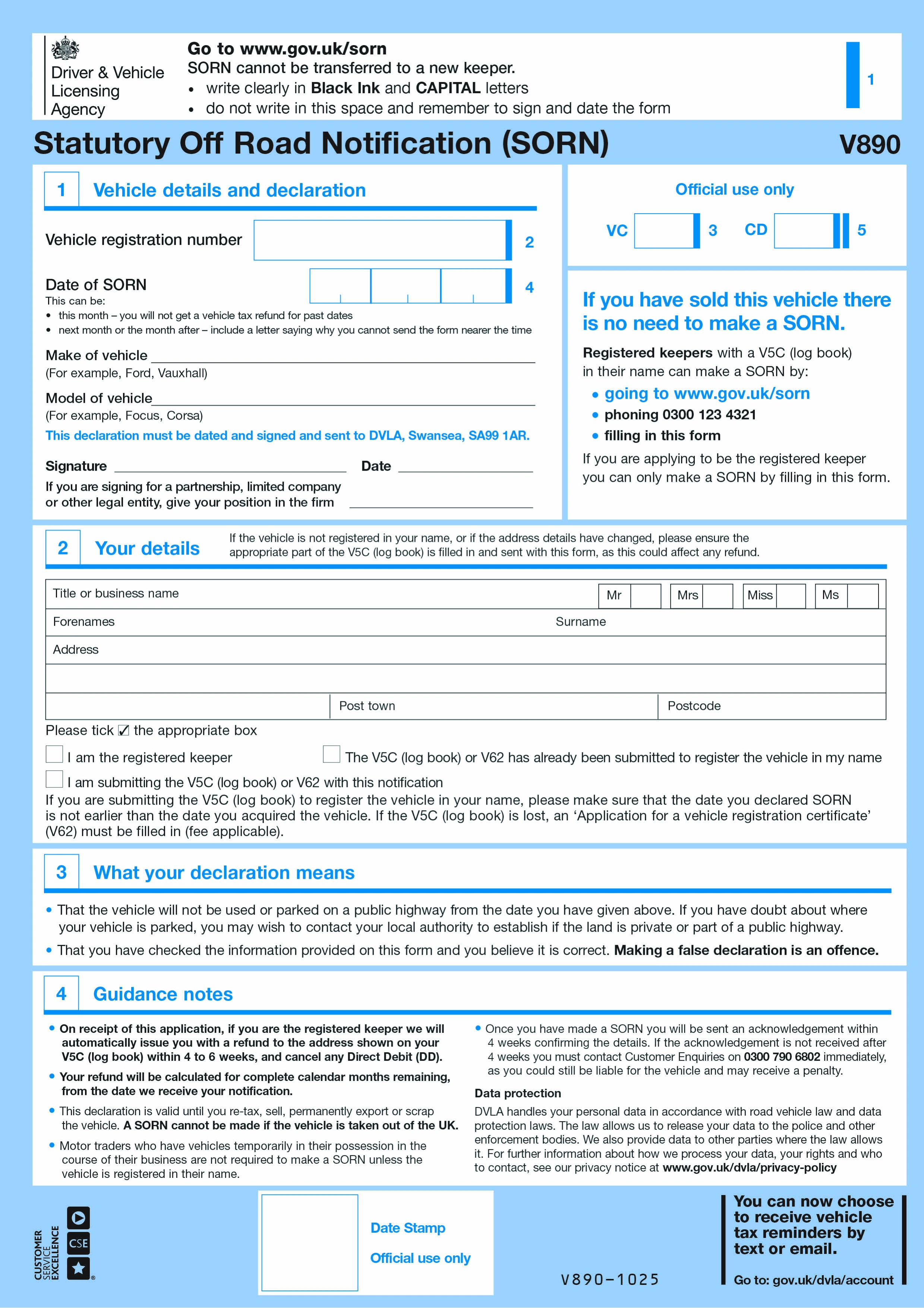
Form V890 is the DVLA's paper Statutory Off Road Notification (SORN) form. A SORN tells the DVLA that a vehicle is being kept off public roads - in a garage, on private land, or in storage - and therefore doesn't need to be taxed or have valid insurance under the Continuous Insurance Enforcement rules. Most people declare a SORN online or by phone using the reference number from their V5C or V11 reminder, but V890 is the required paper route for anyone who isn't yet registered as the vehicle's keeper.
You must make a SORN if you're keeping a vehicle off the public road and it's not currently taxed, or if you want to stop taxing a vehicle you no longer intend to drive (for example, before scrapping it, exporting it, storing it long-term, or restoring it). A SORN lasts indefinitely until the vehicle is taxed again, sold, scrapped, or permanently exported - it does not need to be renewed each year, unlike vehicle tax. Failing to tax or SORN a vehicle can result in an automatic fine from the DVLA.
The online and phone SORN services require you to already be registered as the vehicle's keeper on DVLA's system. If you've just bought a vehicle and haven't yet registered as the keeper - for example, buying a vehicle specifically to keep off-road for restoration or parts - you must use the paper V890 form instead. You'll need to complete the relevant section of the V5C (or apply for one using Form V62, with a fee, if you don't have it) and send it together with V890.
Complete the vehicle details, your name and address, and the reason for the SORN declaration. Fill in the New Keeper Supplement (V5C/2) section of the V5C if you've just acquired the vehicle, or send the full V5C if you're already the registered keeper making a late paper declaration. Post everything to DVLA, Swansea, SA99 1AR. There's no fee to make a SORN itself, though if you need a replacement V5C first (via V62), that fee applies separately. The DVLA processes postal SORN declarations more slowly than the instant online and phone services - allow a few weeks.
Choose your legal form
Browse the library or search to find the exact template you need
Answer simple questions
The guided editor turns your answers into a finished legal form
Sign your document
E-sign, then download, print, or share your legal document instantly
1.Choose your legal form
Browse the library or search to find the exact template you need
2.Answer simple questions
The guided editor turns your answers into a finished legal form
3.Sign your document
E-sign, then download, print, or share your legal document instantly