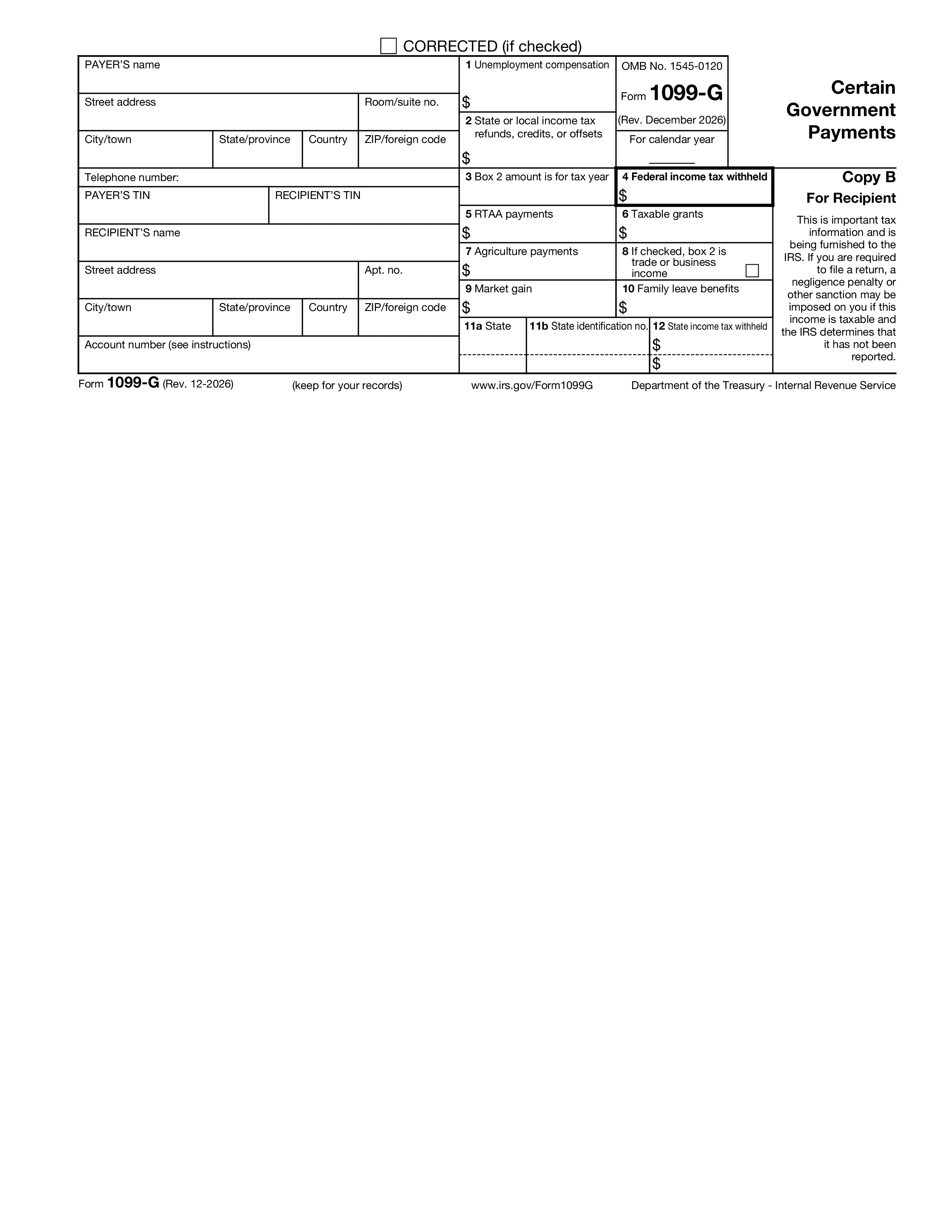
Mẫu 1099-G, Một số khoản thanh toán của chính phủ, là tờ khai thông tin mà các cơ quan chính quyền liên bang, tiểu bang và địa phương phát hành để báo cáo các khoản thanh toán họ đã thực hiện cho người nộp thuế trong năm. Số tiền phổ biến nhất trên 1099-G là tiền trợ cấp thất nghiệp do văn phòng thất nghiệp của tiểu bang chi trả và các khoản hoàn trả, tín dụng hoặc khoản bù trừ thuế thu nhập của tiểu bang hoặc địa phương - nhưng biểu mẫu này cũng bao gồm các khoản trợ cấp chịu thuế, thanh toán nông nghiệp, tăng thị trường cho các khoản vay của Commodity Credit Corporation và hỗ trợ điều chỉnh thương mại tái tuyển dụng.
Các cơ quan chính phủ cấp Mẫu 1099-G cho những người nhận từ 10 USD trở lên tiền trợ cấp thất nghiệp, 10 USD trở lên tiền hoàn thuế của tiểu bang hoặc địa phương, 600 USD trở lên trong các khoản trợ cấp chịu thuế, 600 USD trở lên trong thanh toán nông nghiệp hoặc bất kỳ khoản thanh toán nào khác của chính phủ. Người nhận là cá nhân, công ty hợp danh, tập đoàn, quỹ tín thác và tài sản đã nhận được khoản thanh toán. Cùng một người nhận có thể nhận được nhiều 1099-G từ các cơ quan khác nhau trong cùng một năm - mỗi cơ quan đều được báo cáo riêng trên tờ khai thuế của người nhận.
Hộp 1: Trợ cấp thất nghiệp. Hộp 2: hoàn thuế thu nhập, tín dụng hoặc bù trừ thuế thu nhập của tiểu bang hoặc địa phương. Hộp 3: năm tính thuế được hoàn trả trong Hộp 2. Hộp 4: thuế thu nhập liên bang bị khấu trừ (khấu trừ tự nguyện khi thất nghiệp). Hộp 5: Thanh toán RTAA (hỗ trợ điều chỉnh thương mại việc làm lại). Hộp 6: trợ cấp chịu thuế. Hộp 7: thanh toán nông nghiệp. Ô 8: ô thu nhập từ buôn bán hoặc kinh doanh. Hộp 9: lợi ích thị trường từ các khoản vay CCC. Thông tin tiểu bang xuất hiện trong các hộp bên dưới để báo cáo thuế tiểu bang.
Các cơ quan chính phủ phải cung cấp Bản sao B cho người nhận trước ngày 31 tháng 1. Bản sao A được nộp cho IRS trước ngày 28 tháng 2 trên giấy hoặc ngày 31 tháng 3 dưới dạng điện tử. Những người nộp hồ sơ có 10 tờ khai thông tin trở lên thuộc bất kỳ loại nào đều phải nộp hồ sơ điện tử. Người nhận sử dụng số tiền trên Biểu mẫu 1099-G để hoàn thành Biểu mẫu 1040 của họ: trợ cấp thất nghiệp trên đường dây thất nghiệp, hoàn thuế tiểu bang trên đường dây hoàn trả chịu thuế (tuân theo quy tắc lợi ích về thuế - chỉ phần lợi ích về thuế trong năm trước mới phải chịu thuế), trợ cấp chịu thuế và các khoản thanh toán nông nghiệp theo Phụ lục 1 hoặc Phụ lục F nếu có.
1. Điền vào mẫu đơn
Điền thông tin chi tiết và thông tin của bạn, thêm ngày tháng và tùy chỉnh theo nhu cầu
2. Thêm chữ ký của bạn
Thêm chữ ký có giá trị pháp lý bằng cách vẽ, tải lên hoặc gõ
3. Tải xuống hoặc chia sẻ
Biểu mẫu của bạn đã sẵn sàng, tải xuống, chia sẻ liên kết hoặc gửi qua email ngay lập tức